RDS-TAG-ND15F


What's in the box
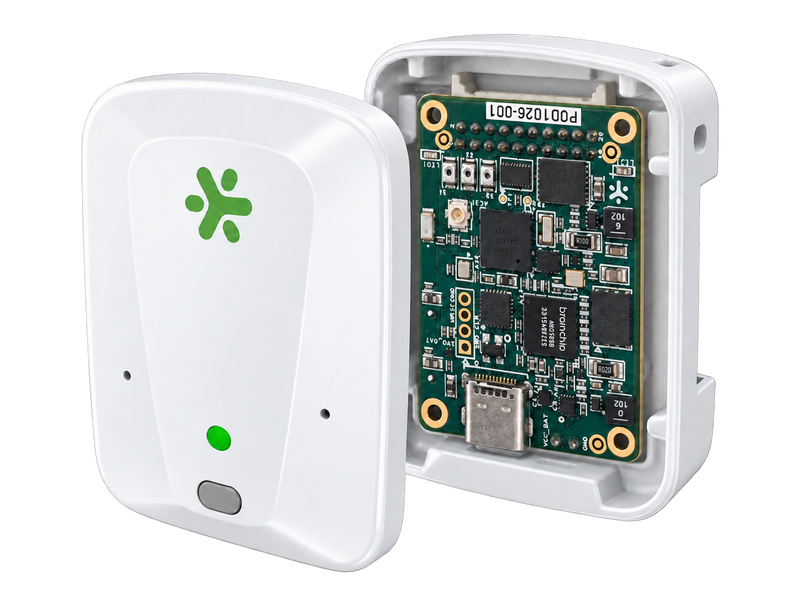
- AkidaTag board (AKD1500 + Nordic nRF5340)
- Battery
Designed for
Wearable Health Monitoring
Industrial Predictive Maintenance
Keyword Spotting & Wake-Word
Always-On Smart Sensing
Quick Start
-
1. Charge the tagPlug a USB-C cable into the tag (none included).
-
2. Get the appInstall BrainChip Connect from Google Play, open for pre-registration (requires Android 13 or later; coming soon to the iOS App Store).
-
3. Power onTurn the tag on with the power switch — the green LED blinks slowly when the tag is ready.
-
4. ConnectOpen the app, allow Bluetooth, tap AkidaTag in the device list, then Connect to Device. The green LED stays on while the app is connected.
-
5. Run the demoOn the Select the Application screen, tap Run Application on the Keyword Spotting card and wait for the badge to say Active.
-
6. Say a wordSpeak clearly and close to the tag — down, go, left, no, off, on, right, stop, up or yes. The red LED flashes and the word appears on the card with its confidence.
AI co-processor
Akida AKD1500 neuromorphic
Connectivity
Nordic nRF5340 Bluetooth LE SoC
Sensors
Integrated accelerometer; microphone
Form factor
Compact battery-powered tag (puck)
Interface
Bluetooth Low Energy (BLE)
Companion app
BrainChip mobile app (iOS/Android)
Capabilities
Keyword spotting, anomaly detection, voice wake-up, on-device adaptive learning
Power
Battery-powered; days of always-on operation
Compatible boards, cables, and reference platforms.